This page explains how to fix common account connection issues in eMoney so your financial accounts continue updating correctly. Most issues can be resolved in just a few minutes.
Why Account Connections Sometimes Stop Updating
Account data is pulled directly from financial institutions, usually overnight. A connection may temporarily stop working for reasons such as:
- A changed password or username
- Updated security questions or multi‑factor authentication
- Changes made by the financial institution
- Temporary outages on the bank or custodian’s end
These issues are common and typically easy to resolve.
Option 1: Repair From the Home Page (Fastest Method)
This is the quickest and most common way to fix a connection.
Step 1
Log in to eMoney.
Step 2
On the Home page, look for the “Attention Needed” notification and click “Repair” next to the affected account.
Step 3
Follow the on‑screen instructions. In most cases, this means re‑entering your login credentials for that financial institution.
Once completed, the account should resume updating automatically.
Option 2: Repair From the Accounts Page
You can also resolve issues directly from the Accounts section.
Step 1
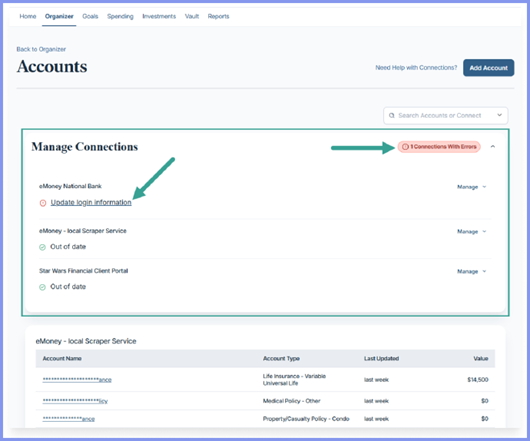
Go to Accounts, then go to Manage Connections, and locate the account with a red exclamation point.
Step 2
Click the action shown (for example, Update login information) and follow the prompts.
Common Tips That Prevent Future Issues
- Update your eMoney login promptly after changing a bank password
- Avoid using VPNs or ad‑blockers while repairing connections
Need Help?
Keeping your accounts connected ensures your financial plan stays accurate and up to date. If you’d like help troubleshooting your account connections, or confirming that your financial institution is available to connect, please contact Navalign — we’re always happy to help.